CS Ticket Tracker
How we build our CS Ticket Tracker on tiket.com
Product Designer
Background
At tiket.com, the Customer Support (CS) team handles approximately 68K+ cases per month, spanning complaints, inquiries, and requests.
A significant portion of users repeatedly reach out to CS just to ask for updates on their cases, creating unnecessary load on agents and friction in the user experience.
From internal data:
- 3,098 users requested updates on their cases within 3 months
- 45% of users had more than 4 interactions with Customer Service
- The highest repeated interaction group reached 1,421 users
- Only 23% of these cases were resolved at L1, while 77% required escalation to L2
This indicates a gap not in resolution, but in visibility and communication.
Problem
When disruptions happen, users don’t perceive them as internal operational issues. They experience:
- Uncertainty (no clarity on progress)
- Lack of control (unable to track their case)
- Decreased trust (feels like their issue is ignored)
On the business side:
- High volume of repeat inquiries increases CS workload
- Inefficient handling due to unnecessary follow-ups
- Limited automation capability due to system constraints (Salesforce only supports certain case types)
Core problem: Users rely too heavily on CS agents for updates due to lack of self-service visibility.
Goal
Design a scalable CS Ticket Tracking experience that:
- Provides clear visibility into ticket status and progress
- Reduces dependency on Customer Service agents
- Improves user trust during waiting periods
- Supports operational efficiency and company OKRs
- Encourages users to rely more on self-service experiences
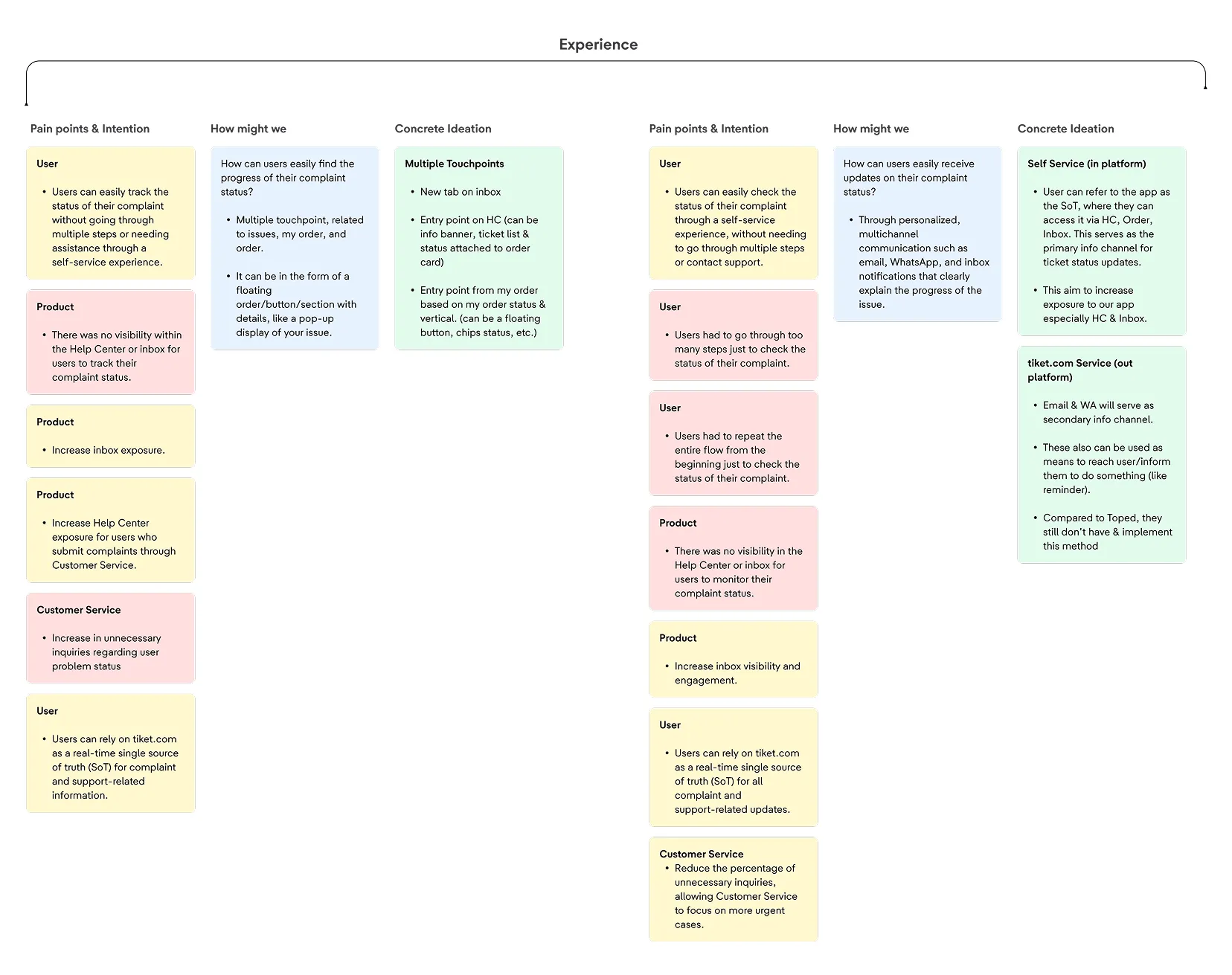
Gathering pain points & intentions
To better understand the problem space, I collaborated closely with Customer Service teams, Product stakeholders, internal operational teams, and end users. Together, we explored pain points, operational constraints, and user behaviors surrounding the complaint tracking experience.
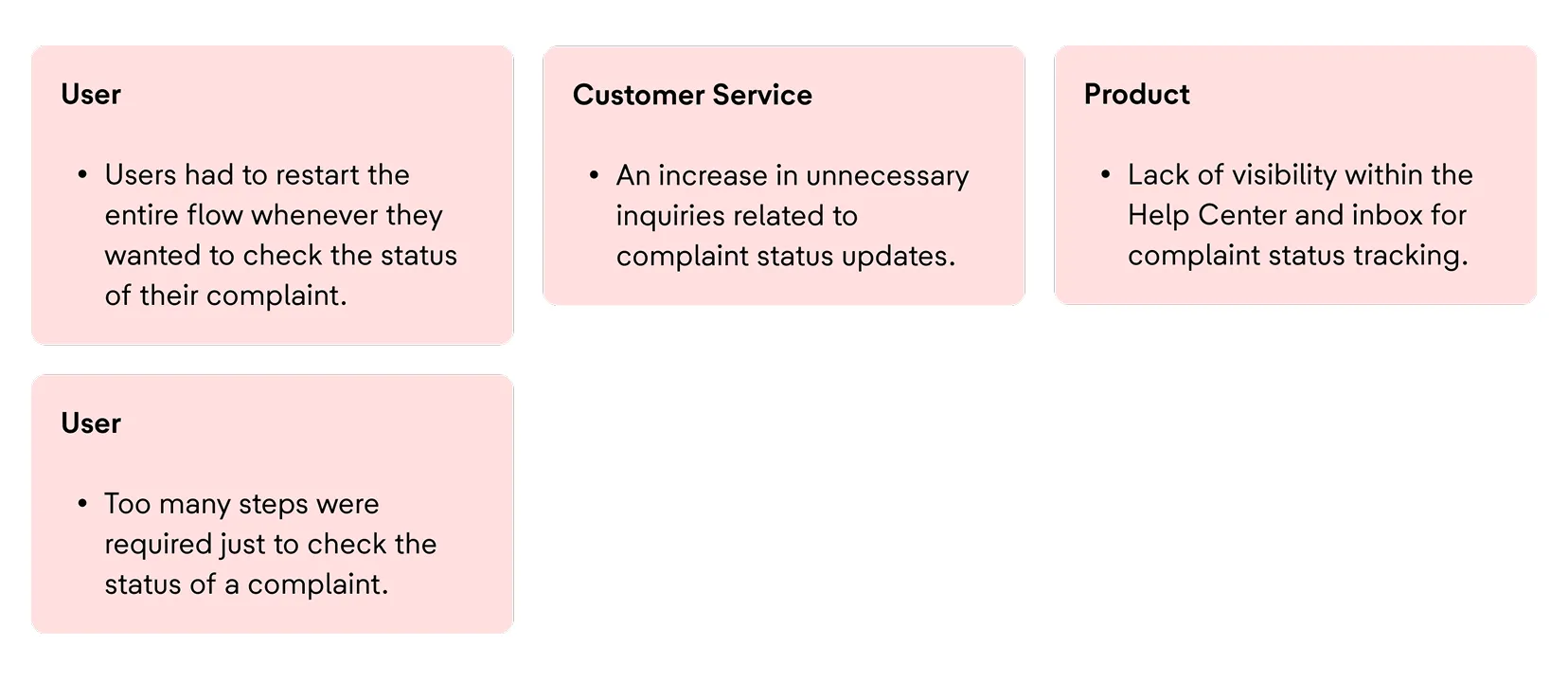
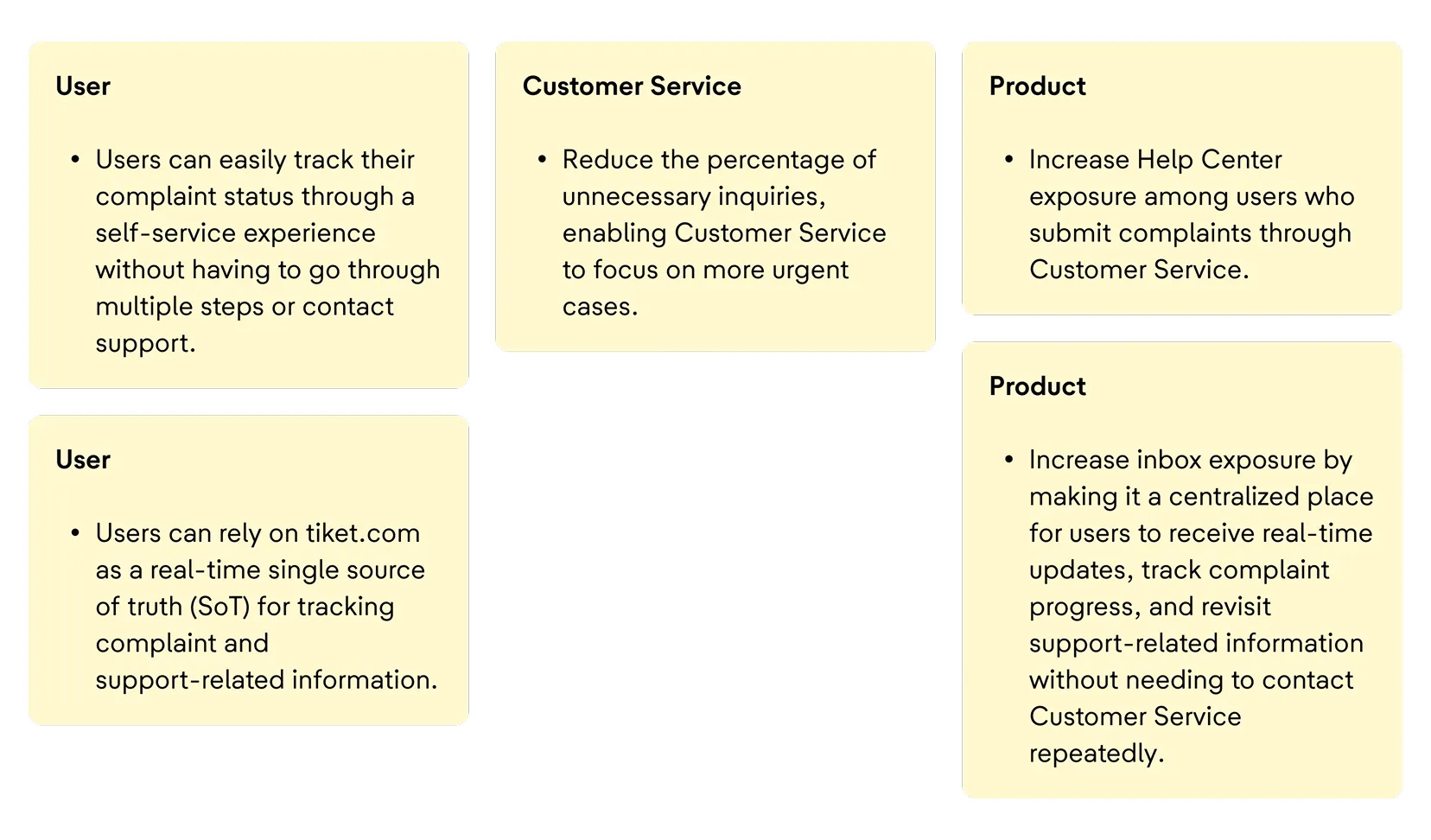
From these findings, we identified several recurring pain points and intentions across different stakeholders.
Pain Point
Intention
The research revealed two key gaps that heavily influenced the overall complaint support experience:
- Communication Gap, Users often felt uncertain due to limited visibility, lack of proactive updates, and insufficient reassurance throughout the resolution process.
- Experience Gap, Users lacked a centralized self-service experience to monitor complaint progress independently, leading to repeated contact with Customer Service.
These recurring patterns later became the starting point for exploring design opportunities through the HMW (How Might We) framework.
Design opportunity
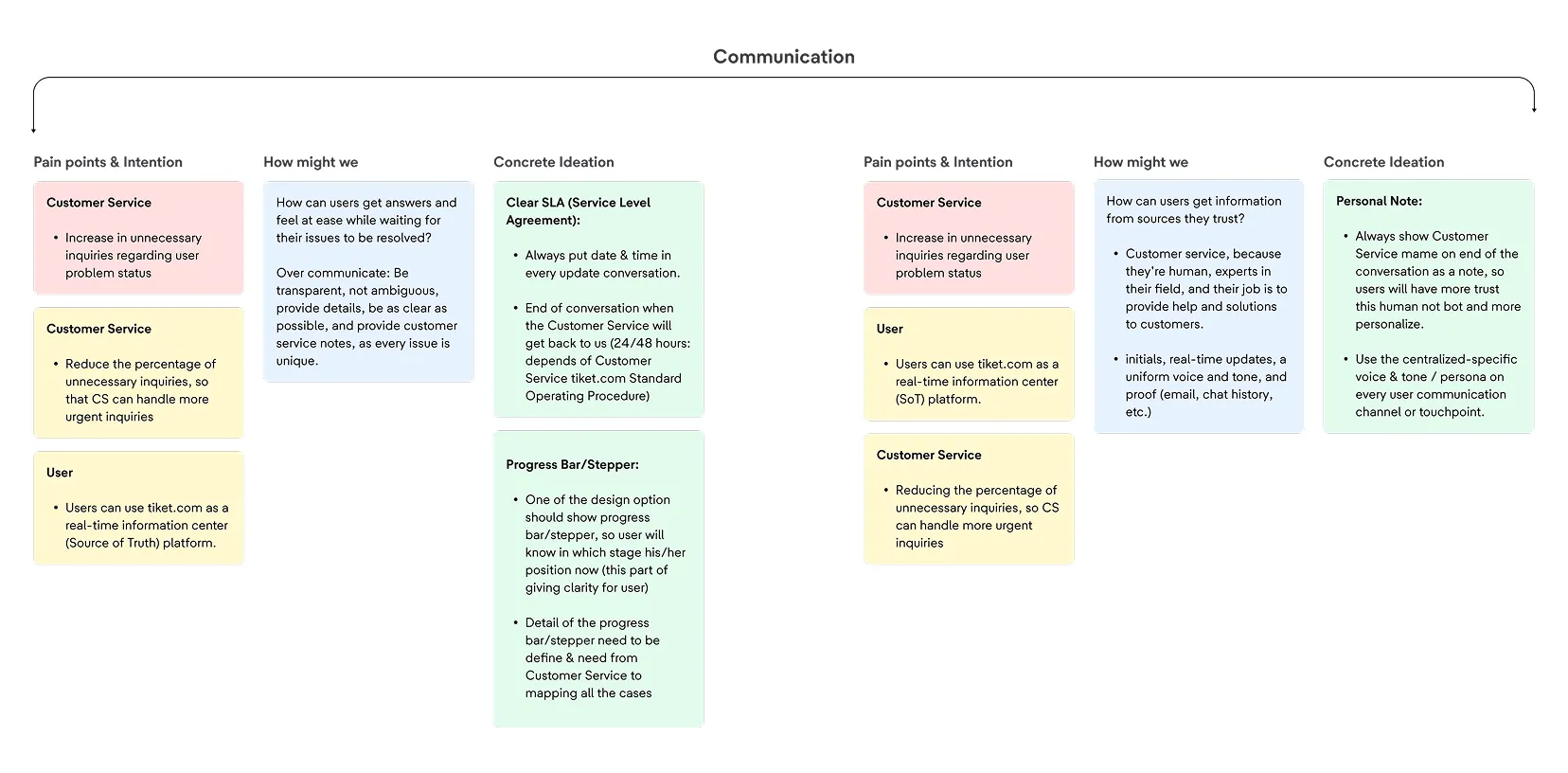
How might we help users get answers and feel reassured while waiting for their issues to be resolved?
- By creating a communication experience that is transparent, proactive, and contextual. Users need clear explanations, meaningful progress updates, and better visibility into their issue status — because every case requires different handling and expectations.
How might we help users receive information from sources they trust?
- Customer Service is often perceived as the most trusted source because it is human, responsive, and handled by experts. To strengthen that trust digitally, the experience should include identifiable CS representatives, real-time updates, consistent communication tone, and supporting records such as chat history, email logs, or related communication proof.
From these insights, two key opportunity areas emerged as the foundation for the overall solution direction: Communication and Experience.
Communication Opportunity Mapping
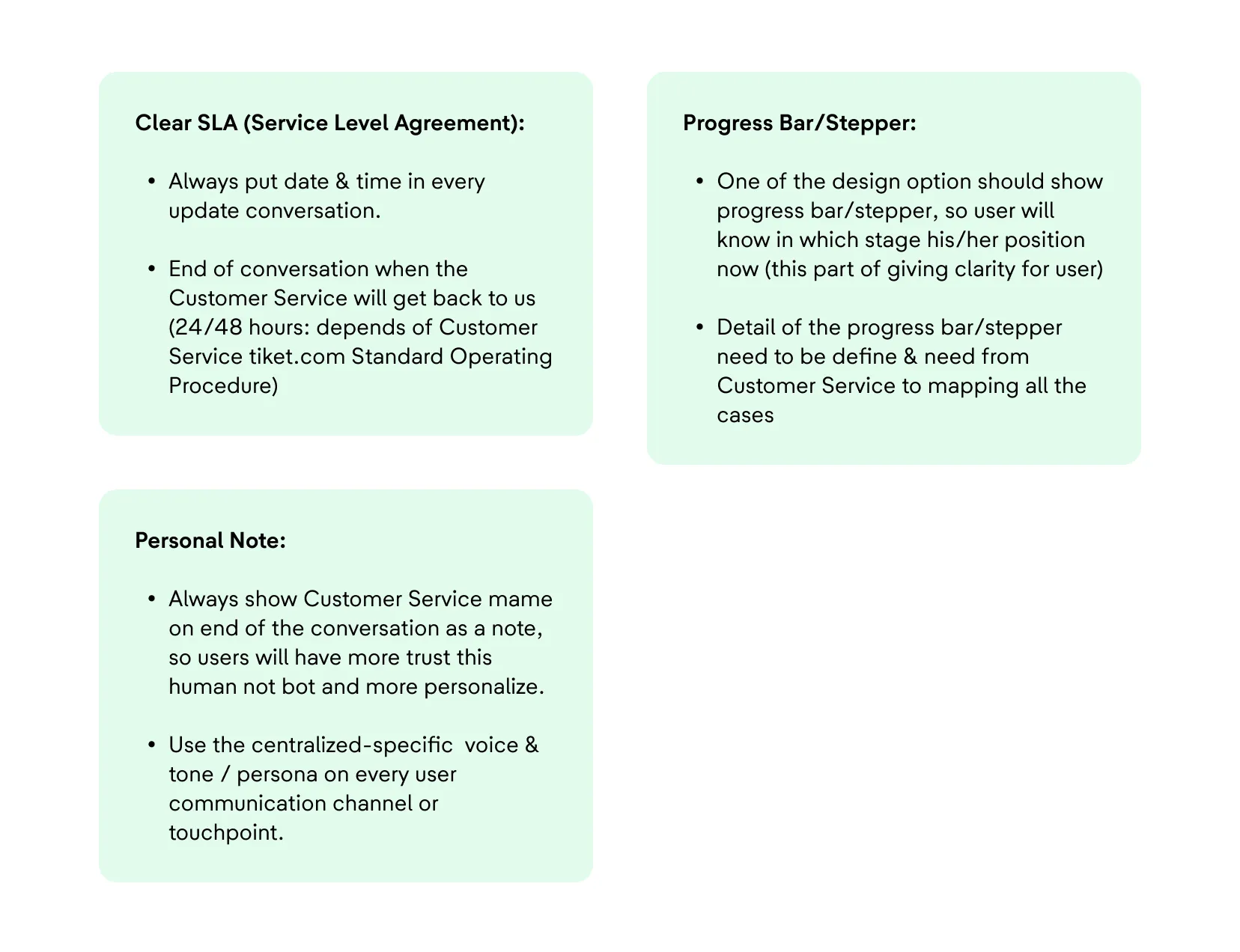
Communication system
Designing a communication system that keeps users informed, reassured, and in control.
Experience Opportunity Mapping
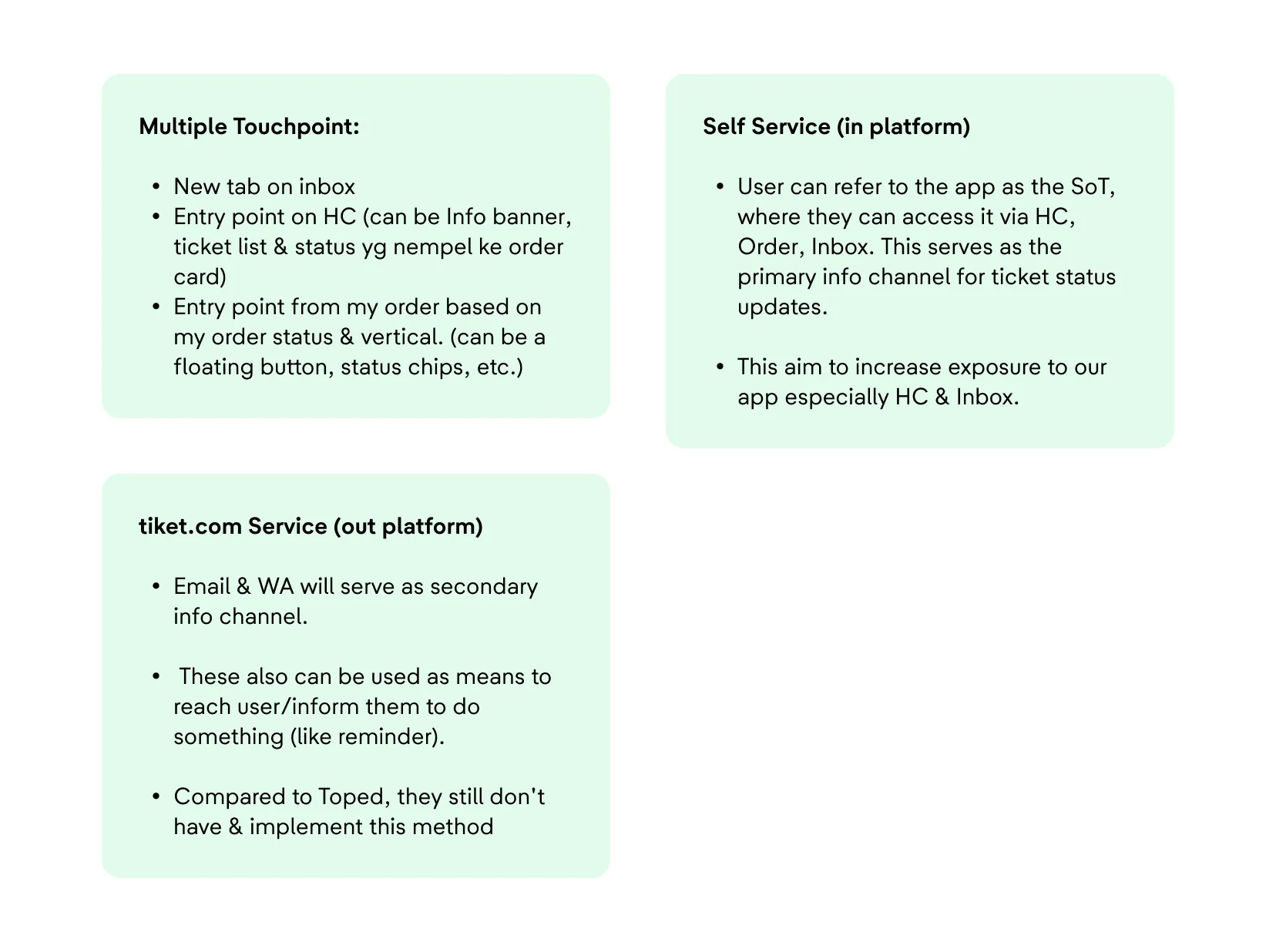
Experience System
Creating a connected support experience across self-service and customer service channels.
Strategic explanation / principles / considerations
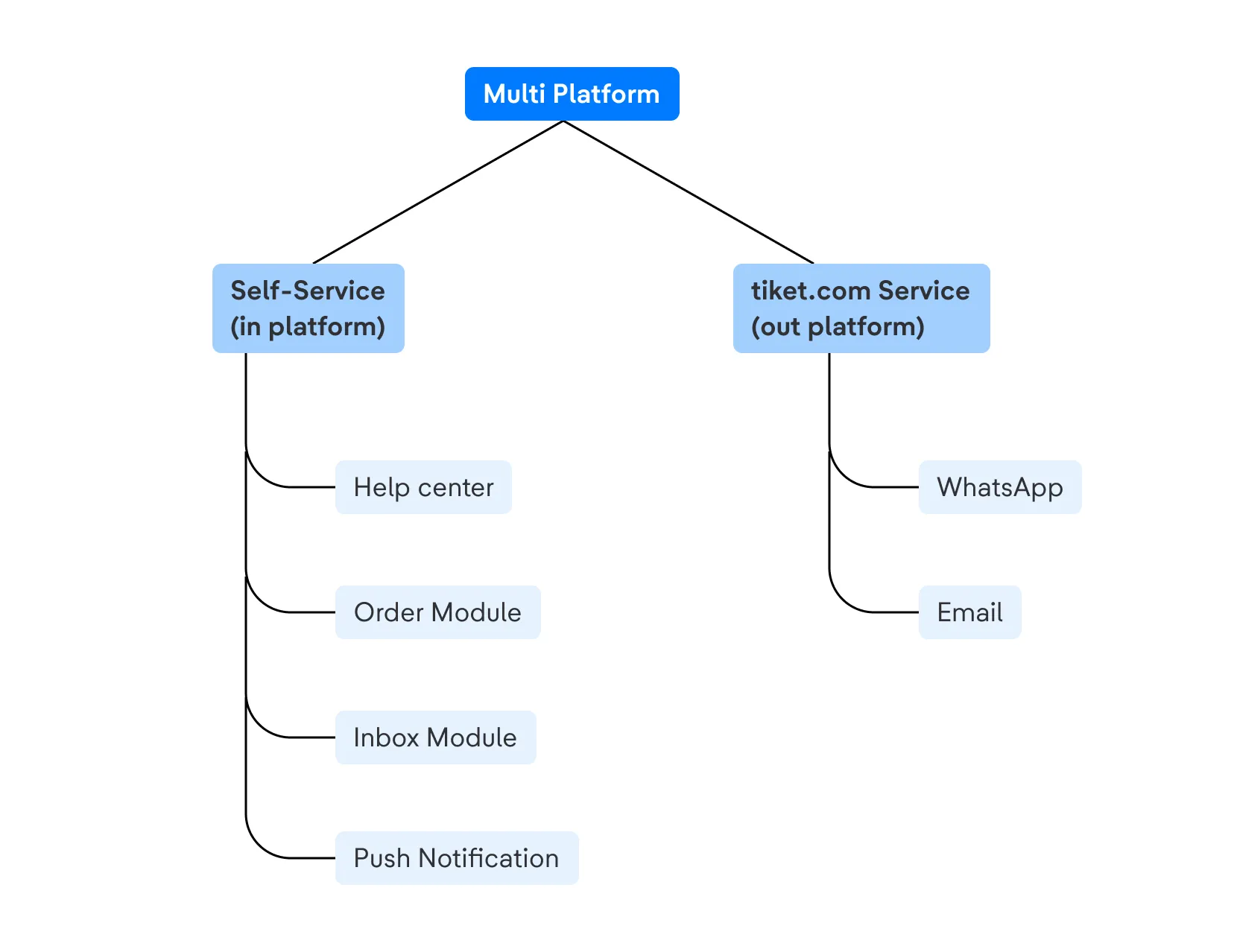
Ecosystem / system mapping
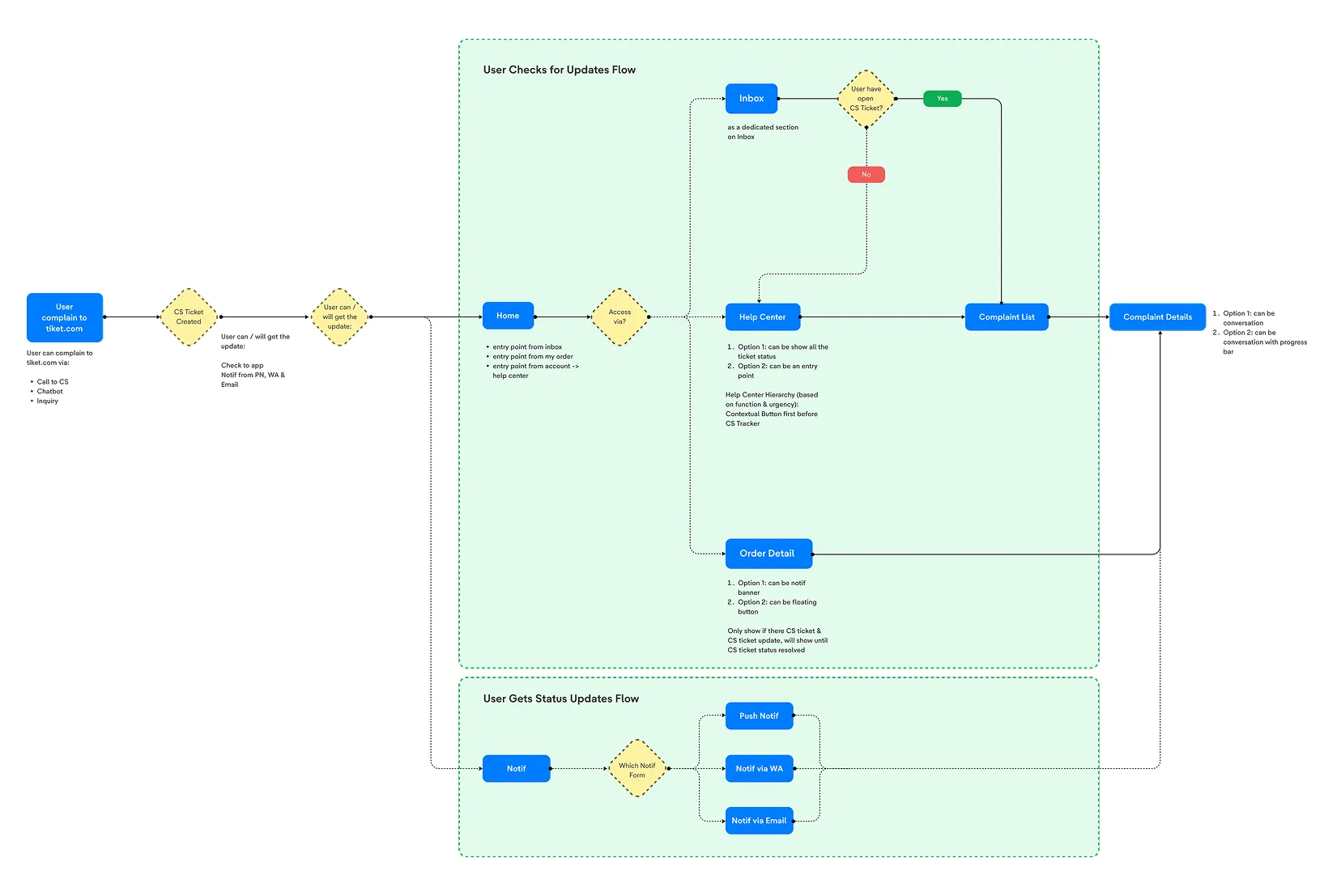
Support Experience Flow
Mapping how users navigate issue tracking across multiple touchpoints.
Translating Insights into Solutions
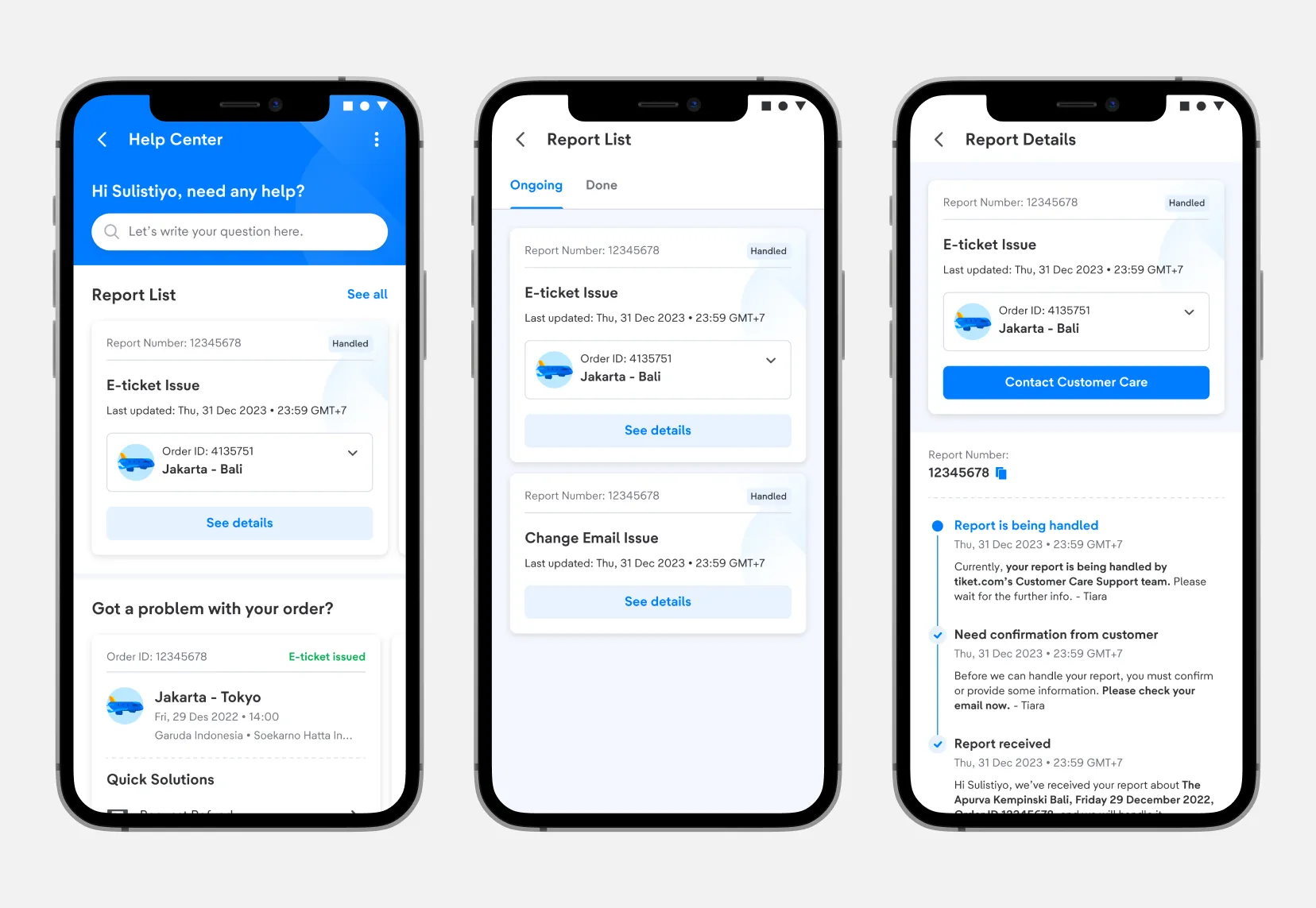
We introduced a CS Ticket Tracking experience within the Help Center designed to help users stay informed throughout the issue-resolution journey. The experience enables users to:
- View real-time ticket status updates
- Understand which stage their case is currently in
- Access contextual information without needing to contact Customer Service
- Be guided toward the most relevant next action (wait, follow up, or escalate)
Additionally, the solution focused on creating a more connected and scalable support ecosystem by:
- Standardizing ticket visibility across communication channels (Email, WhatsApp, etc.)
- Leveraging automation wherever possible within existing system limitations
- Designing flows that connect users directly to L2 support when escalation is required
Solution Output
Final interface and communication solutions for complaint handling.
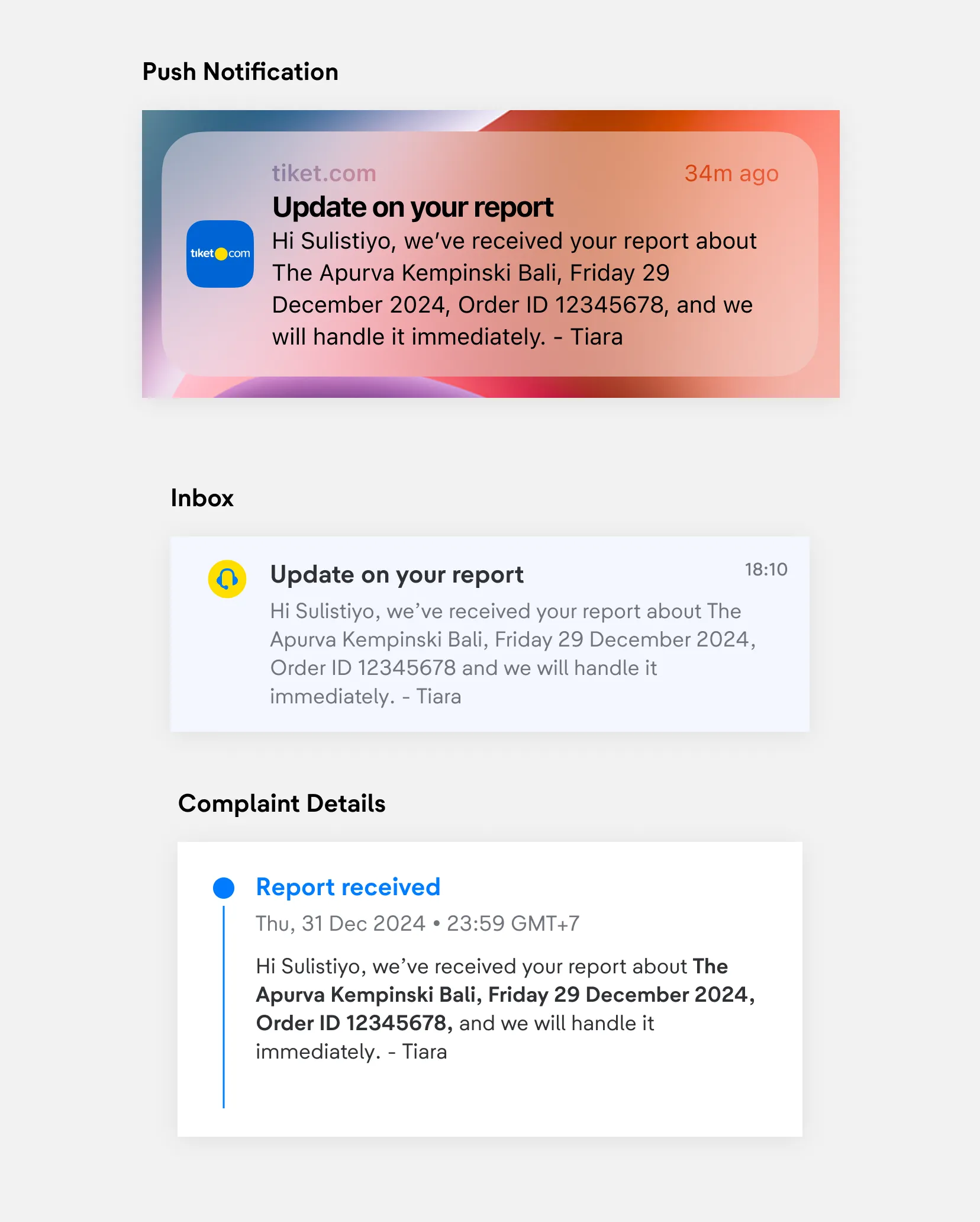
1. Unified complaint update experience across platforms
To create a more consistent, transparent, and human-centered communication experience across multiple touchpoints:
- Always include clear date & time information in every complaint update to help users understand the latest progress and timeline.
- Clearly communicate when Customer Service will follow up next (within 24–48 hours, based on tiket.com’s Standard Operating Procedure) to set expectations and reduce uncertainty.
- Always include the Customer Service agent’s name at the end of each conversation to make interactions feel more personal, trustworthy, and human-driven rather than automated.
- Maintain a centralized and consistent voice & tone across every communication channel and touchpoint to ensure a cohesive user experience.
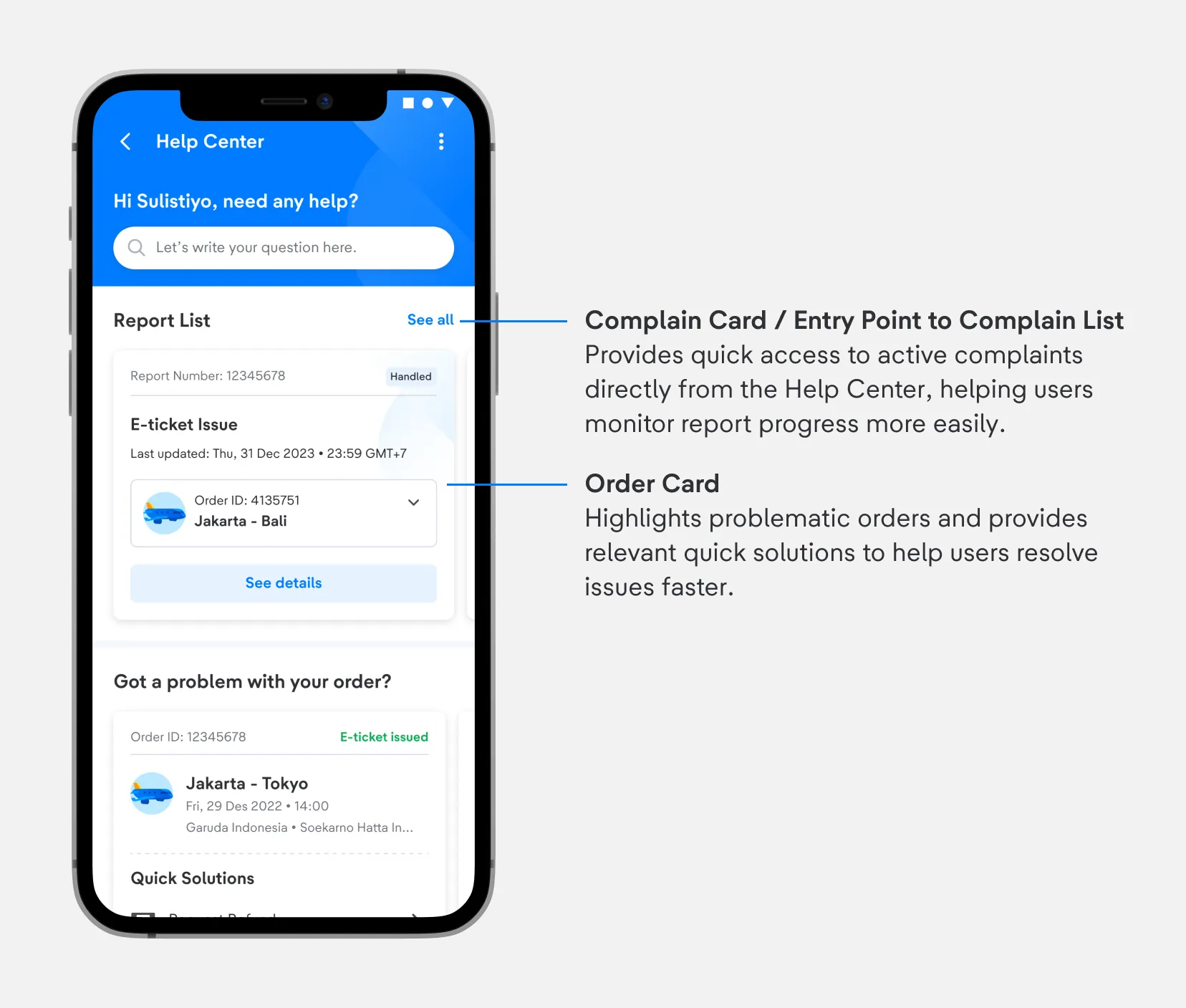
2. Complaint Entry Point on Help Center
This feature introduces a dedicated complaint entry point within the Help Center, allowing users to quickly access and monitor their ongoing reports without needing to contact Customer Service repeatedly. By surfacing active complaints directly on the homepage, users gain better visibility into their issue status, recent updates, and related orders in a more centralized and self-service experience.
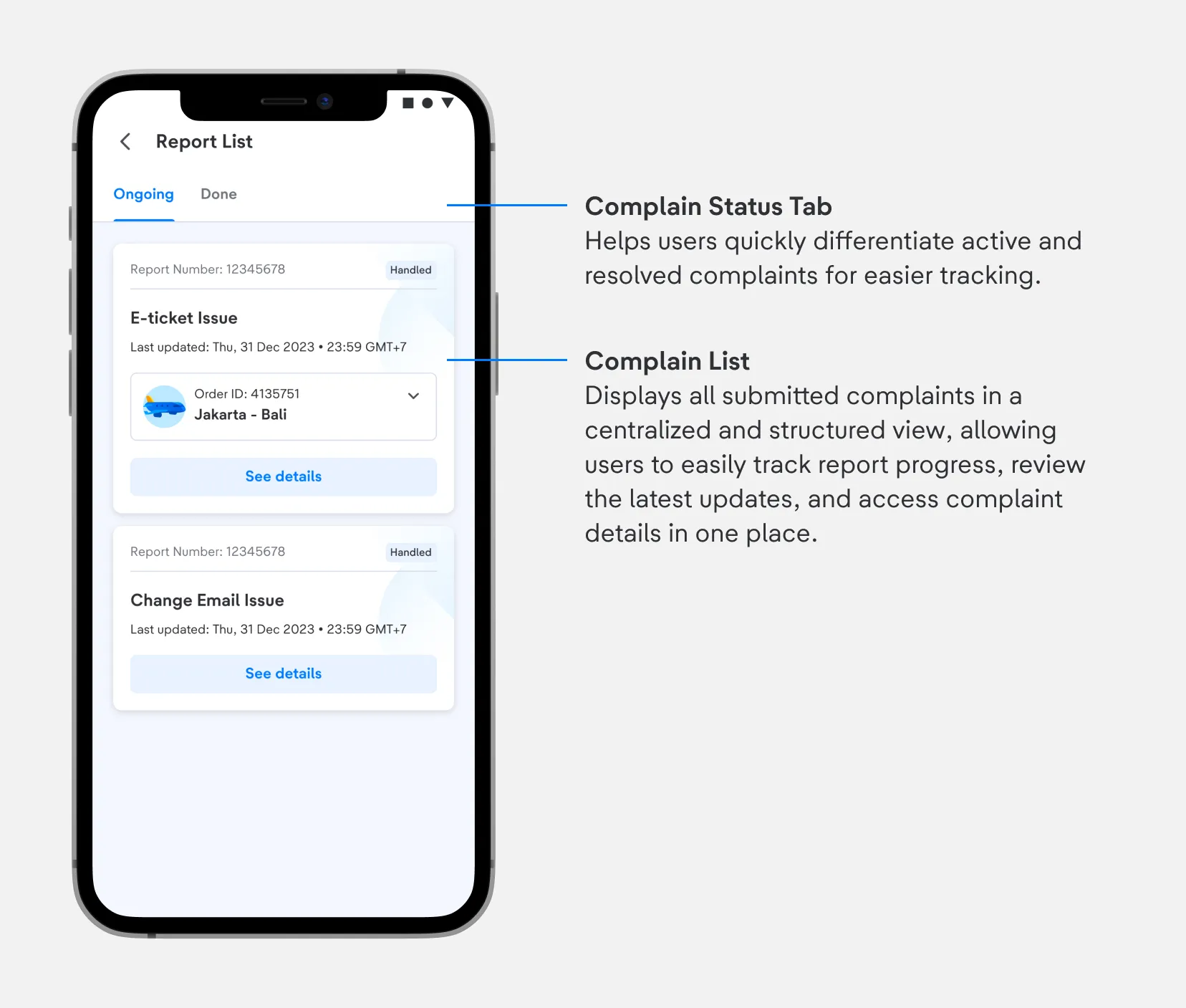
3. Complaint List
The Complaint List provides a centralized space for users to monitor all submitted complaints in one structured view. Users can easily distinguish between ongoing and resolved tickets, review the status of their complaint updates, and access detailed information without needing to repeatedly contact Customer Service. This helps create a more transparent, trackable, and self-service support experience.
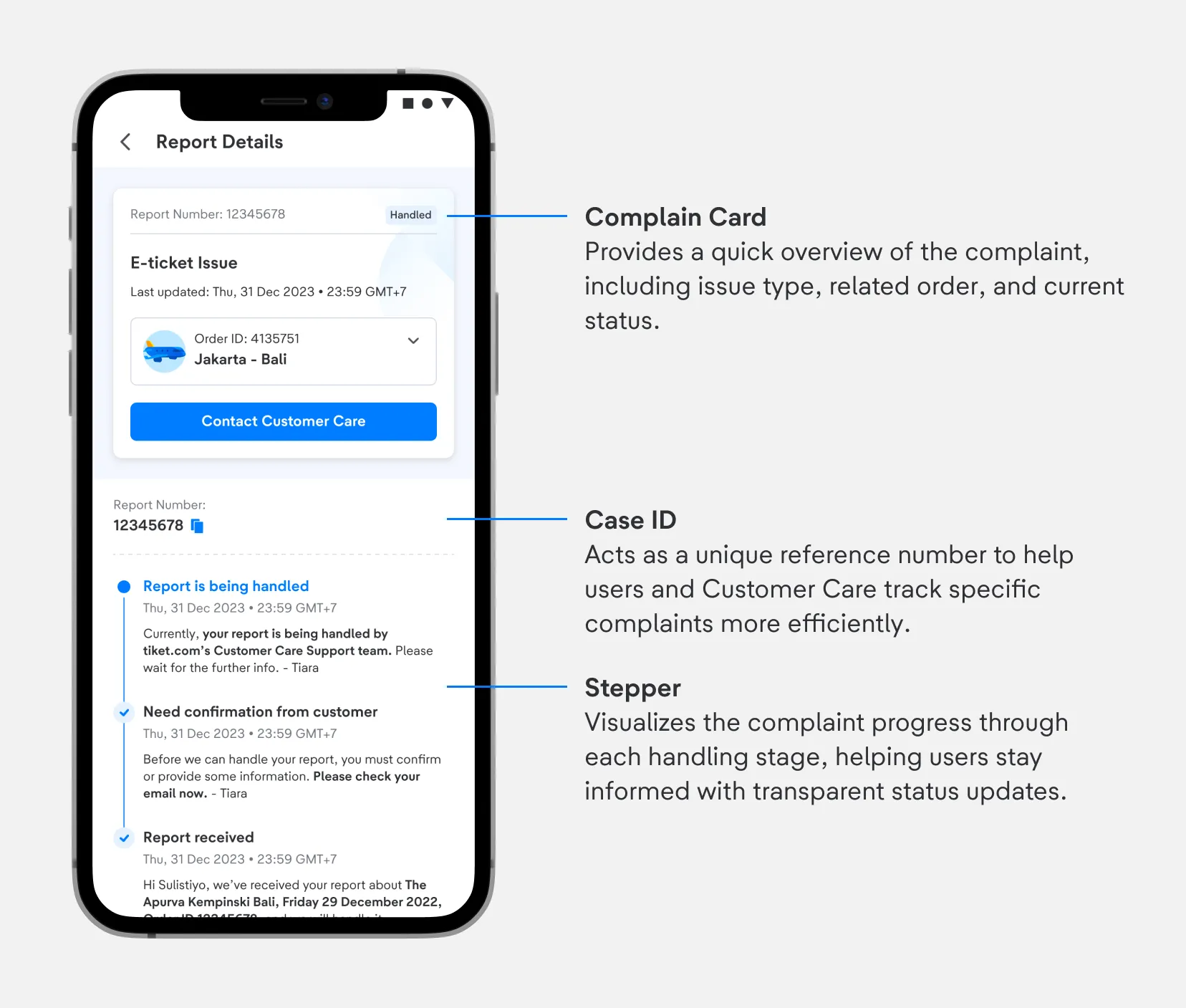
4. Complaint Details
The Complaint Details page provides users with complete visibility into their complaint handling process in a more transparent and structured way. Users can review complaint information, track progress through each handling stage, and monitor the latest updates in real time.
By presenting detailed timelines and clear status communication, the experience helps reduce uncertainty and minimizes the need for users to repeatedly contact Customer Service for progress updates.
Operational & Experience Impact
- Feature Adoption & Experience
- 33.6% Adoption Rate (April 2024), showing strong user engagement toward the Case Status Tracker feature.
- 16.8% decrease in re-contact to Customer Service (April 2024), indicating users relied more on self-service tracking instead of repeatedly contacting agents.
- CTR reached 67.4% (Click/Impression), showing high visibility and interest toward the feature.
- CVR from overall page visits reached 4.41%, proving users actively accessed ticket detail and tracking pages.
- Operational Efficiency
- Re-contact rate successfully dropped from 33% to 28%, reducing unnecessary follow-up inquiries to Customer Service.
- Helped prevent queue overload in CS operations by shifting update-checking behavior into self-service flows.
- Reduced repetitive update requests and enabled Customer Service teams to focus on higher-priority and more critical cases.
- Behavioral Shift
- Users increasingly relied on Help Center and Case Status Tracker to monitor complaint progress independently.
- Transparent SLA visibility and CS communication reduced user anxiety and minimized impulsive “Contact Us” behavior.
- The feature encouraged a shift from agent-dependent support behavior toward a more scalable self-service experience.
Closing Thoughts
Customer complaints are not only about resolving problems, but also about managing uncertainty, expectations, and trust throughout the experience.
By creating a connected support ecosystem between self-service and human-assisted channels, this solution helps users feel more informed, reassured, and in control during their support journey. At the same time, it enables Customer Service operations to become more scalable, efficient, and focused on higher-impact cases.
This project was not simply about building a tracking feature, but about redefining how support communication and complaint handling should work as a unified experience across the entire platform.